
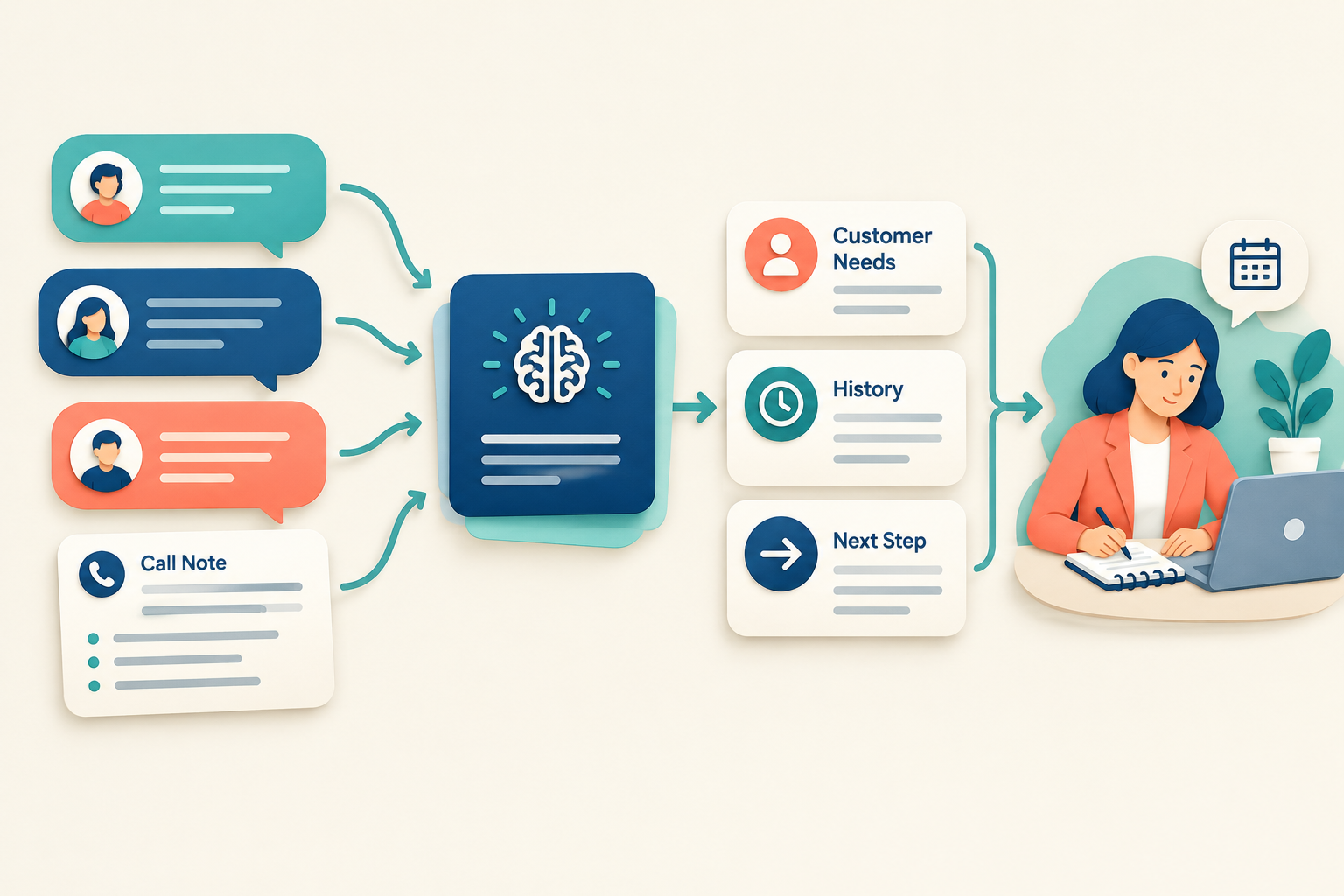
A prospect might explain what they need on a call, ask a question on WhatsApp and share a timeline in a form. When it is time to follow up, a salesperson has to piece those details together.
AI can help by turning recorded customer interactions into a concise summary. Instead of rereading every note or message, a rep can quickly review the customer’s requirements, conversation history and current status.
A summary is a useful shortcut, but it should not replace the original record or the salesperson’s judgement. Here’s how conversation summarization works, where it helps and what to check before acting on it.

Table of Contents
ToggleWhat Is an AI Customer Conversation Summary?
An AI customer conversation summary is a short brief generated from information recorded about a customer or lead. Depending on the CRM, it may bring together details from calls, notes, emails, messages and other activity.
A useful summary helps answer:
- Who is the customer, and what are they looking for?
- What has the team discussed so far?
- What questions or concerns remain?
- What is the current status?
- What was agreed as the next step?
For example, a summary for an interior design enquiry might note the rooms the customer wants renovated, their preferred timeline, a question about materials and the next agreed action.
How AI Summarizes Conversations
AI summarization generally involves three steps:
- Gather recorded context. The system reviews information available in the customer’s record, such as messages, call notes and activity history.
- Identify key details. It looks for requirements, questions, concerns, decisions and next steps.
- Create a shorter brief. It presents the relevant points in a form that is quicker to review than the full conversation history.
The result depends on the quality of the information in the CRM. If a conversation happened outside the system or important notes were never recorded, the summary may leave out useful context.
Why Sales Teams Use Conversation Summaries
Prepare for calls faster
Before a call, a salesperson can review the customer’s needs, previous questions and current status. That makes it easier to continue the conversation without asking the customer to repeat everything.
Make lead handovers smoother
When a lead changes hands, the new owner can use a summary to understand the history and what needs attention. They should still check the latest activity and any commitments before contacting the customer.
Keep follow-ups relevant
A summary can remind a rep what the customer asked about and what the team agreed to do. That gives the rep a better starting point for a follow-up than a generic message.
Spot missing details
A summary may make gaps in the record more visible—for example, a customer’s timeline or a question that has not yet been answered. The rep can confirm missing information rather than treating an assumption as fact.
What to Check Before Relying on a Summary
AI summaries are generated from recorded information, so review them with care:
- Check important details against the original conversation. Verify prices, dates, requirements and commitments.
- Keep uncertainty clear. A tentative preference should not be presented as a confirmed decision.
- Look for recent updates. A newer message or call may change what the customer needs.
- Correct incomplete records. Add missing notes or update the lead record when needed.
- Use judgement before contacting the customer. A summary helps with preparation; it does not decide what to say or promise.
How Ridhzo Summarizes Lead Conversations
Ridhzo’s AI Lead Summary creates a concise brief with the lead’s identity, requirements, conversation history and current status. Its lead context can include recorded calls, notes, audio transcripts, emails and WhatsApp chats, as well as form answers and lead fields.
Teams can use the summary before a call or during a handover. Ridhzo also offers a Pre-Call Brief that synthesizes the lead’s timeline, stated budget, requirements and previous objections, with suggested opening lines and talking points.
As with any AI-generated summary, the team should check important details against the recorded activity. Ridhzo’s AI does not send customer messages without human approval.
AI usage is subject to monthly credit allowances: the documented plans include 15 credits on Free, 300 on Starter and 2,000 on Unlimited. A lead summary uses one AI credit.
A Practical Workflow for Using Summaries
- Record the interaction. Add call notes or ensure relevant messages and activities are captured in the lead record.
- Generate or review the summary. Use it to understand the lead’s requirements, history and status.
- Check the latest activity. Confirm that nothing has changed since the summary was created.
- Decide the next step. Choose whether to call, answer a question, share information or schedule another follow-up.
- Update the record. Save new details and the agreed next action so the next interaction has current context.
For example, if a clinic enquiry includes a question about appointment availability, the rep can check the summary, verify the latest availability and respond with accurate options. The summary helps prepare the reply; the clinic still needs to confirm the details.
AI Summaries Are Only as Useful as the Records Behind Them
Conversation summaries can reduce the time spent reviewing a long lead history and help teams pick up where the last interaction ended. They work best when customer activity is recorded consistently and summaries are checked before important decisions or messages.
For a complete lead management process, connect summaries with clear lead ownership, dated follow-ups and a pipeline that reflects how your team sells. You can also read How AI Helps Sales Reps Follow Up With Leads for ways to use AI during the next customer interaction.
FAQs
Can AI summarize WhatsApp conversations?
It can when the CRM has access to the relevant conversation data. The summary can only reflect information that is available in the lead record.
Can AI summaries replace call notes?
No. A summary can help review recorded activity, but teams should still keep accurate records and verify important details.
Should a salesperson send a message directly from an AI summary?
The salesperson should review the conversation and confirm every detail before sending a message. AI-generated guidance should not be treated as a confirmed customer commitment.
How can teams make summaries more useful?
Record calls, messages, customer requirements and agreed next steps in the lead record. Clear, current information gives the summary better context.
CTA: Keep every customer interaction connected to the lead record, then use AI summaries to prepare for the next conversation.