
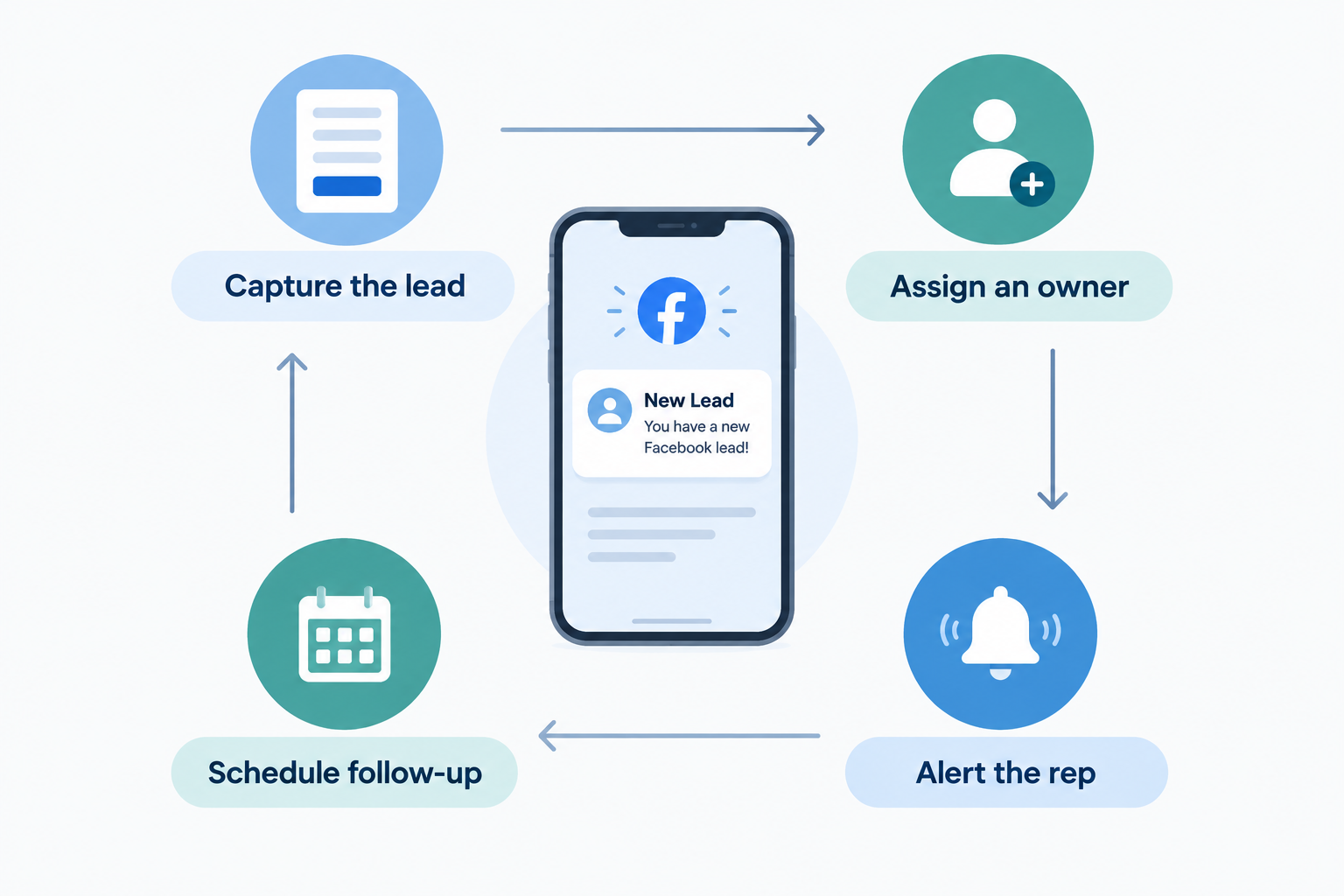
Someone sees your Facebook ad, taps it and submits the pre-filled form. Two seconds of effort on their side. What happens next decides whether that enquiry becomes a conversation or a lost opportunity.
In most teams, the lead sits in Ads Manager until someone downloads a CSV, emails it around, and waits for a rep to pick it up. Hours — sometimes days — pass before anyone calls.
This guide shows you how to remove those steps so each Facebook lead lands with a named salesperson, with an alert, the moment it arrives.
What “Directly to Your Sales Team” Actually Means
Sending leads directly to your team is not a group email or a shared spreadsheet. It means four things happen automatically:
- Capture — the form submission becomes a lead record in a shared system, without anyone downloading or copying it.
- Assignment — the lead gets one named owner, decided by a rule rather than a manager forwarding messages.
- Alert — that owner is notified on their phone with enough context to respond.
- Next action — the follow-up is scheduled, so the lead cannot silently sit.
Miss any one of these and leads still get lost, just more politely.
Step 1: Connect Facebook Lead Ads to a CRM
Connect your Facebook account through your CRM’s lead source settings, choose the relevant Page, and select the forms you want to import.
Ridhzo supports direct capture from Facebook and Instagram Lead Ads. Submissions arrive automatically with the contact details, the person’s form answers, and the campaign and form they came from.
Two details worth getting right:
- Use form-level selection. Ad accounts often run forms for jobs, suppliers or marketing alongside sales forms. Filter to import only the forms that should reach your sales team. An empty filter captures every form on the Page.
- Backfill if you need history. If enquiries are already sitting in Meta, a backfill option can sync past leads (for example the last 30 days), with duplicates detected by email, phone or lead ID.
If you run multiple branches or dealerships, Ridhzo also allows one Facebook Page to be connected across multiple workspaces, copying incoming leads to each of them — useful for franchise and regional setups.
Step 2: Set Up Automatic Assignment
The core of “directly to your sales team” is routing. Instead of notifying everyone, decide in advance who receives each lead:
- Round-robin — new leads are distributed evenly across your reps.
- Capacity-based routing — the rep with spare capacity gets the next enquiry.
- Team rules — leads from certain forms, campaigns or sources go to a specific team.
Ridhzo supports all three. A single owner per lead means no double-calling, and no enquiries that everyone assumed someone else was handling.
Agree on cover for leave, busy periods and enquiries that arrive outside working hours, so assignment rules never route a lead to someone unavailable for days.
Step 3: Turn On Mobile Alerts
Assignment is useless if the owner doesn’t notice the lead. Make sure push notifications are enabled on the devices your reps actually use, and run a test enquiry to confirm the right person receives it.
A useful alert opens the lead record with context, not just a phone number — the course they asked about, the property type, the budget they shared.
Read What Is Speed-to-Lead and Why Does It Matter? for why the gap between enquiry and first contact attempt is the most expensive gap in your process.
Step 4: Automate the First Touch and Follow-Up
Ridhzo automations follow WHEN → IF → THEN logic, so you can set up, for example:
- WHEN a new lead arrives from a Facebook form → THEN assign it by round-robin and notify the owner.
- WHEN a lead is assigned → THEN schedule a follow-up task for the same day.
- WHEN a lead has no activity for 24 hours → THEN alert the owner or manager.
An automatic acknowledgement message can confirm receipt, but keep a human response behind it — the prospect is waiting for a person, not an auto-reply.
Step 5: Respond With the Form Answers
The rep opens the record, sees what the person actually asked for, and uses one-tap actions to open WhatsApp, call, or email. A first message that references the form reads like attention, not a template:
Hi Priya, thanks for asking about our weekend digital marketing course on Facebook. You mentioned you prefer online classes — would you like the schedule and fee details?
Then record the outcome, set a dated next action, and move the lead through your pipeline stages.

A Simple Daily Routine for the Manager
Automation handles routing; someone still needs to watch the gaps:
- New leads without an owner
- Enquiries awaiting a first response
- Overdue follow-ups
- Active opportunities with no scheduled next action
Ridhzo’s pipeline board, dashboards and insights support this review by source, salesperson and stage — so you can see which Facebook forms actually produce responding prospects, not just cheap enquiries.
Common Mistakes
- Connecting the form but skipping assignment rules. Every rep sees the lead; no rep owns it.
- Counting an auto-acknowledgement as a response. Only a personal contact attempt counts.
- Leaving test forms in the filter. Sales receives marketing sign-ups and job enquiries it doesn’t need.
- Notifying the whole team by default. Group notifications feel safe but dilute responsibility.
- No alert testing. The rule works; the notification never fired on the rep’s phone.
Set It Up in Ridhzo
- Go to Settings → Lead Sources and select Facebook / Instagram Lead Ads.
- Connect your Facebook account, choose the Page, and select the sales forms to import.
- Backfill past leads if you want existing enquiries in the system.
- Configure assignment — round-robin, capacity-based or team rules.
- Enable mobile push notifications and submit a test enquiry.
- Add an automation to assign new leads, schedule a same-day follow-up and alert on inactivity.
- Review unassigned leads and overdue actions each working day.
Start with one form. Test the full journey — submission to assigned owner to scheduled follow-up — before connecting the rest.
Frequently Asked Questions
Can Facebook leads go straight to individual salespeople instead of a shared list?
Yes. With automatic assignment rules such as round-robin, capacity-based routing or team rules, each lead is routed to one named rep, who receives a mobile notification.
Does this work for leads submitted outside working hours?
The capture and assignment happen instantly regardless of timing. The notification reaches the owner’s phone whenever it arrives; agree with your team whether out-of-hours leads are handled the same evening or first thing next morning.
What about Facebook leads that come in as messages rather than forms?
Connecting Lead Ads covers Instant Form submissions. Website enquiries and messages need their own capture routes — check How to Manage Leads From Facebook, Instagram and Google in One Place for the full picture.