
Real estate teams lose deals in predictable ways: an ad enquiry sits in a form export for hours, nobody knows which agent owns it, site visits aren’t tracked, and follow-ups depend on memory. A CRM should fix the structure of that process — not add another tool your reps avoid.
This guide explains what real estate lead management actually requires, the capabilities to compare, and how Ridhzo supports these workflows.
What Real Estate Lead Management Involves
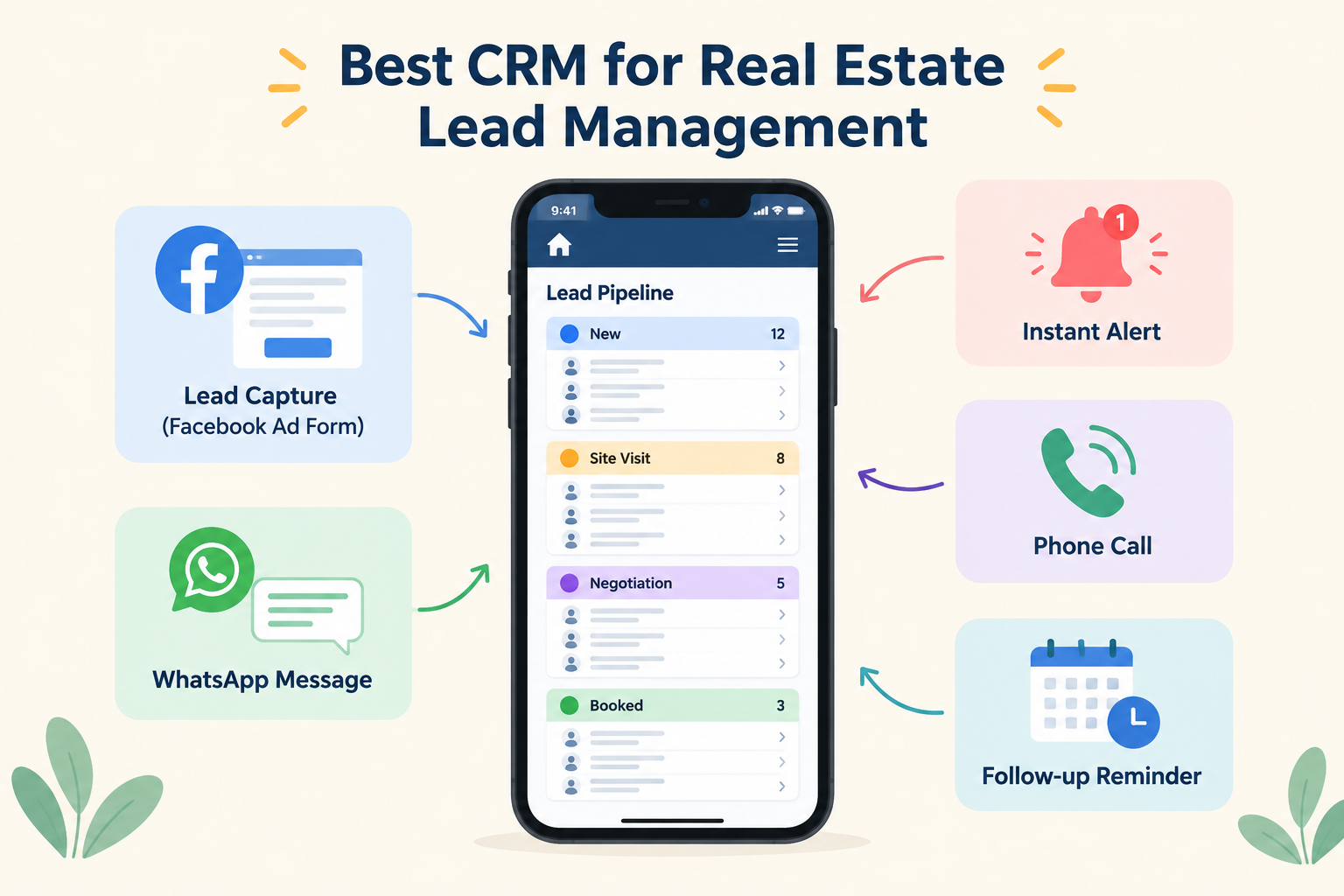
A real estate lead CRM needs to carry a lead from enquiry to booking:
- Capture — Facebook and Instagram Lead Ads, Google Lead Form Ads, website forms, walk-ins, missed calls and referrals, all in one place.
- Assign — every enquiry gets an owner instantly, split fairly across agents or project teams.
- Respond — the agent gets an alert and reaches out in minutes, not hours.
- Track the conversation — calls, WhatsApp messages, budget, configuration and preferred location recorded on the lead.
- Site visits — scheduled, confirmed with a map link, and checked into on arrival.
- Follow up — dated reminders and gentle multi-touch follow-up until the buyer decides.
- Report — pipeline by stage, response time, and which campaigns produce bookings, not just enquiries.
What to Compare When Choosing
Not every “real estate CRM” is built for this workflow. Test these:
Lead capture depth. Does it connect natively to Meta Lead Ads (Facebook and Instagram) and Google Lead Form Ads? Do leads arrive within seconds, or do you download CSVs? Can you import old leads with deduplication when you switch?
Assignment and alerts. Round-robin, capacity-based or team-based assignment matters when you run multiple projects. New-lead alerts should be high-priority push notifications that open the lead record directly.
Mobile-first, not mobile-available. Agents work from their phones at sites, in cars and at expos. A CRM that’s a stripped-down companion app to desktop software will not get used. Test opening a lead, calling and logging a note one-handed.
Automatic call tracking. This is the big one for real estate. Reps make dozens of calls a day; if logging depends on them typing notes, the history decays within a week. Look for automatic call syncing (incoming, outgoing, missed, with talk duration) and note that automatic sync is Android-only in some products, including Ridhzo.
WhatsApp built in. Most buyers in most markets converse on WhatsApp. One-tap WhatsApp from the lead card, and — if you run volume — automated messaging through the official WhatsApp Business API with receipts and auto-stop on reply.
Custom fields and statuses for property. You need Budget, Configuration (2BHK/3BHK), Preferred Location, Possession Timeline as fields, and a pipeline like New → Contacted → Site Visit Scheduled → Site Visit Done → Negotiation → Booked / Lost. A generic pipeline you can’t customise will fight your process.
Follow-ups that don’t slip. Dated reminders that appear as phone notifications, answered calls that auto-complete the pending callback, and overdue escalation to a manager.
Site-visit support. Meeting confirmations with a Google Maps pin, GPS check-in, and outcomes recorded on the timeline. This is the step most CRMs ignore and real estate lives on.
Automation without code. Look for simple WHEN → IF → THEN rules, e.g. “new lead from Project A → assign round-robin to Project A team → send brochure on WhatsApp → schedule follow-up in 1 hour.”
Pricing model. Many CRMs charge per user per month, which gets expensive as your team grows. Also check what’s in the free tier — lead limits, seats, and whether core features like the mobile app and call sync are gated.
How Ridhzo Covers Real Estate Workflows
Ridhzo is a mobile-first lead CRM, and real estate is one of its documented use cases. Documented support includes:
- Sources: Facebook/Instagram Lead Ads, Google Lead Form Ads, hosted forms (useful for QR codes on hoardings), website webhooks, CSV import and Android call sync. Sync Past Leads with deduplication by email, phone or lead ID.
- Custom fields and statuses: full configurability for property workflows, with pipeline Kanban boards.
- Assignment: round-robin, capacity and team-based routing with high-priority push alerts.
- Android call sync and Caller ID: calls logged automatically with talk duration; answered calls auto-complete follow-ups; incoming calls from leads show the buyer’s name before the agent answers.
- WhatsApp: one-tap personal WhatsApp on every plan; automated WhatsApp through a supported WhatsApp Business API connection, plus tracked links so you know when a buyer opens a floor plan.
- Meetings: site visits with saved project locations, map pin in confirmations, GPS check-in and outcomes.
- Sequences: multi-step WhatsApp/email nurture, e.g. Day 0 brochure, Day 2 amenities video, Day 5 site-visit invite, Day 9 offer reminder — with auto-stop on reply or conversion.
- AI assistance: pre-call briefs, 1-click field updates (budget, location) from call notes, and stage playbooks with qualifying questions per status.
- Pricing: Free plan (1 user, 300 leads), Starter at ₹249/month (3 users, 5,000 leads), Unlimited at ₹449/month (unlimited users and leads). WhatsApp Business API conversation fees are billed by Meta/your provider.
How to Decide
Shortlist two or three options and run one real enquiry through each end-to-end: capture → assignment → first call (check whether it logs itself) → follow-up reminder → site visit → outcome. The CRM that makes that journey shortest and requires the least typing wins, regardless of feature lists.