
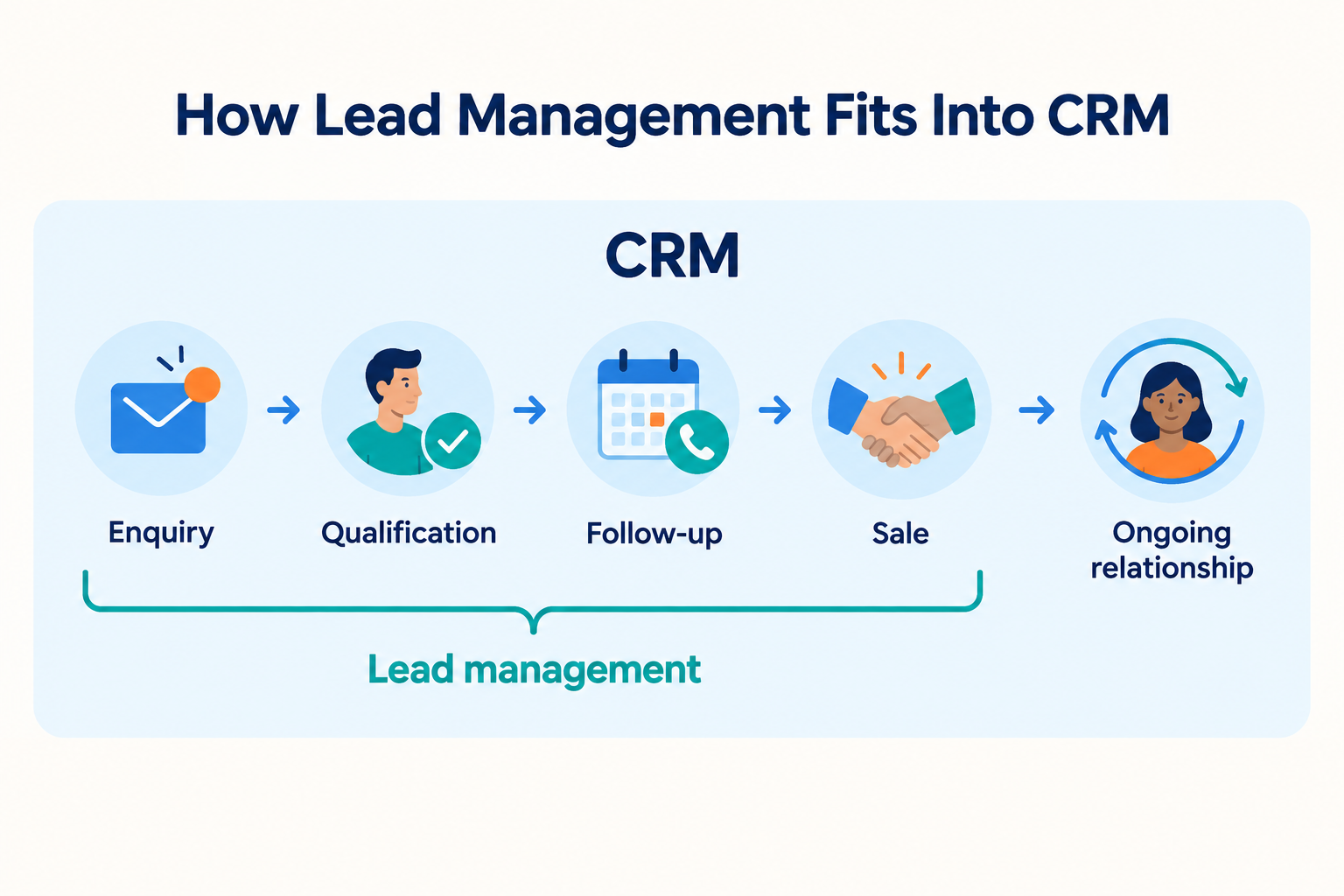
Lead management defines how your team handles an enquiry. A CRM can hold the records, tasks, and activity history that support those steps.
A practical workflow might look like this:
- Record the enquiry. Save contact details, the source, and the customer’s request.
- Assign responsibility. Give one salesperson ownership of the next action.
- Understand the requirement. Discuss fit, timing, budget, and decision-making needs.
- Update progress. Record the conversation and move the opportunity to the appropriate stage.
- Schedule follow-up. Set a specific action and due date.
- Record the outcome. Mark the opportunity as won, lost, or requiring later contact.
- Avoid losing context after the sale by passing relevant information to whoever handles the customer next.
The software supports consistency, but your team still needs clear working habits.
A reminder is only useful when the next action is meaningful. A pipeline is only useful when people understand what each stage means.
A Practical Example: Managing an Interior Design Enquiry
Imagine an interior design business receives an enquiry for a kitchen renovation.
Before the Sale: Lead Management
The team needs to understand the project and help the prospect reach a decision.
The salesperson records the property location, discusses the approximate budget, schedules a consultation, and prepares a proposal. After sending the proposal, they agree on a date to discuss questions.
At this point, the important information is the prospect’s requirements, current stage, conversation history, and next action.
After the Sale: Broader Customer Relationship Needs
Once the customer accepts, other activities may begin: project handover, communication preferences, service requests, or future work.
Those needs may be handled in a broader CRM, a project management system, or other connected software. The right arrangement depends on what each product actually supports.
This example shows why evaluating the whole workflow matters. A business may have excellent enquiry handling while still needing a separate system for project delivery.
Do You Need Lead Management Software or a Broader CRM?
Start with the problem your team is experiencing.
When a Lead-Focused CRM May Fit
A lead-focused system is worth evaluating when the main difficulties involve incoming enquiries and sales follow-up.
Perhaps leads arrive through several channels, responsibilities are unclear, or callbacks depend on a salesperson’s memory. Managers may struggle to see which opportunities need attention.
In that situation, prioritise the ability to record enquiries, assign owners, track progress, and maintain a reliable next-action list.
For teams working away from a desk, test those tasks on the phones they actually use.
When Broader CRM Capabilities May Matter
A wider set of CRM capabilities may be relevant when your business also needs structured processes for existing customers.
Examples include multiple contacts within an account, recurring contract renewals, service requests, or coordinated activity across departments.
Check these requirements individually. Some products include them; others require additional modules, integrations, or separate software.
When a Spreadsheet May Still Be Enough
A spreadsheet can be a reasonable starting point when one person handles a manageable number of enquiries and consistently updates the records.
At minimum, track contact details, requirements, source, owner, status, last contact, and the next action with its due date.
Consider moving when manual updates and reminder checks become difficult to maintain. The deciding factor is the reliability of the process, rather than a fixed number of leads.
Where Ridhzo Fits
Ridhzo is a mobile-first lead CRM focused on the daily work of handling enquiries and sales conversations.
Its documented follow-up capabilities include creating a dated task on a lead, adding notes, and choosing a type such as Call, WhatsApp, Meeting, or Task. Teams can view follow-ups under Today, Upcoming, Overdue, and Completed.
For mobile access, Ridhzo provides a native Android app and a browser-installable progressive web app for Android and iOS. Lead profiles provide access to lead details and activity history, with communication actions for calls, WhatsApp, SMS, and email.
Automatic device call syncing is documented for the native Android app and requires the relevant permissions. It records incoming, outgoing, and missed calls with timestamps and talk duration.
For the interior design example, a salesperson could record the consultation details and create a follow-up for the agreed proposal discussion. On supported Android setups, call activity can sync back to the lead record.
These capabilities are relevant when a team needs a shared mobile process for sales conversations and callbacks. If your requirements also include project delivery, billing, or customer support, assess those separately.
How to Evaluate Software for Your Business
Use a realistic enquiry to test the product. A feature checklist alone will not show whether it suits your team.
1. Define the Work You Need to Improve
Write down the tasks that cause problems.
“Salespeople forget agreed callbacks” is a useful requirement. “We need a powerful CRM” is too broad to guide a decision.
Identify whether the difficulty is capturing enquiries, ownership, response, follow-up, visibility, or work after the sale.
2. Map the Full Journey
Follow an enquiry from arrival to outcome.
Include who handles it, what information they need, how the next action is recorded, and what happens when the customer accepts.
This exposes handovers that a simple feature comparison may miss.
When testing mobile software, use the actual device types your team relies on. Confirm which functions are available in the browser and which require a native app.
4. Check Automation Carefully
Ask what starts an automation, what it does, and what happens when the normal process changes.
For example, if a follow-up is scheduled automatically, can the team adjust it when the prospect asks for a later date?
Also distinguish between opening a messaging app from a contact record and sending automated messages through a configured messaging integration.
5. Review Reporting and Total Cost
Choose reports that answer management questions: Which enquiries need attention? Which follow-ups are overdue? Where are opportunities getting stuck?
For cost, check the full setup you need, including user access, relevant features, messaging charges, integrations, and onboarding where applicable.
A suitable system should match both your workflow and the effort your team can realistically put into maintaining it.
Common Mistakes to Avoid
Treating lead management and CRM as mutually exclusive choices. Lead management can be carried out inside a CRM. Many businesses need one system that supports their process.
Assuming more features mean a better fit. Extra capabilities offer little value if daily tasks are difficult to complete.
Expecting software to define the sales process. Your team still needs clear ownership, stage definitions, and follow-up expectations.
Assuming every mobile version works identically. Browser access and native apps can have different capabilities. Test the functions that matter on the devices your team uses.
Ignoring the handover after a sale. Decide what information the next team needs and where that work will happen.
Frequently Asked Questions
Is lead management the same as CRM?
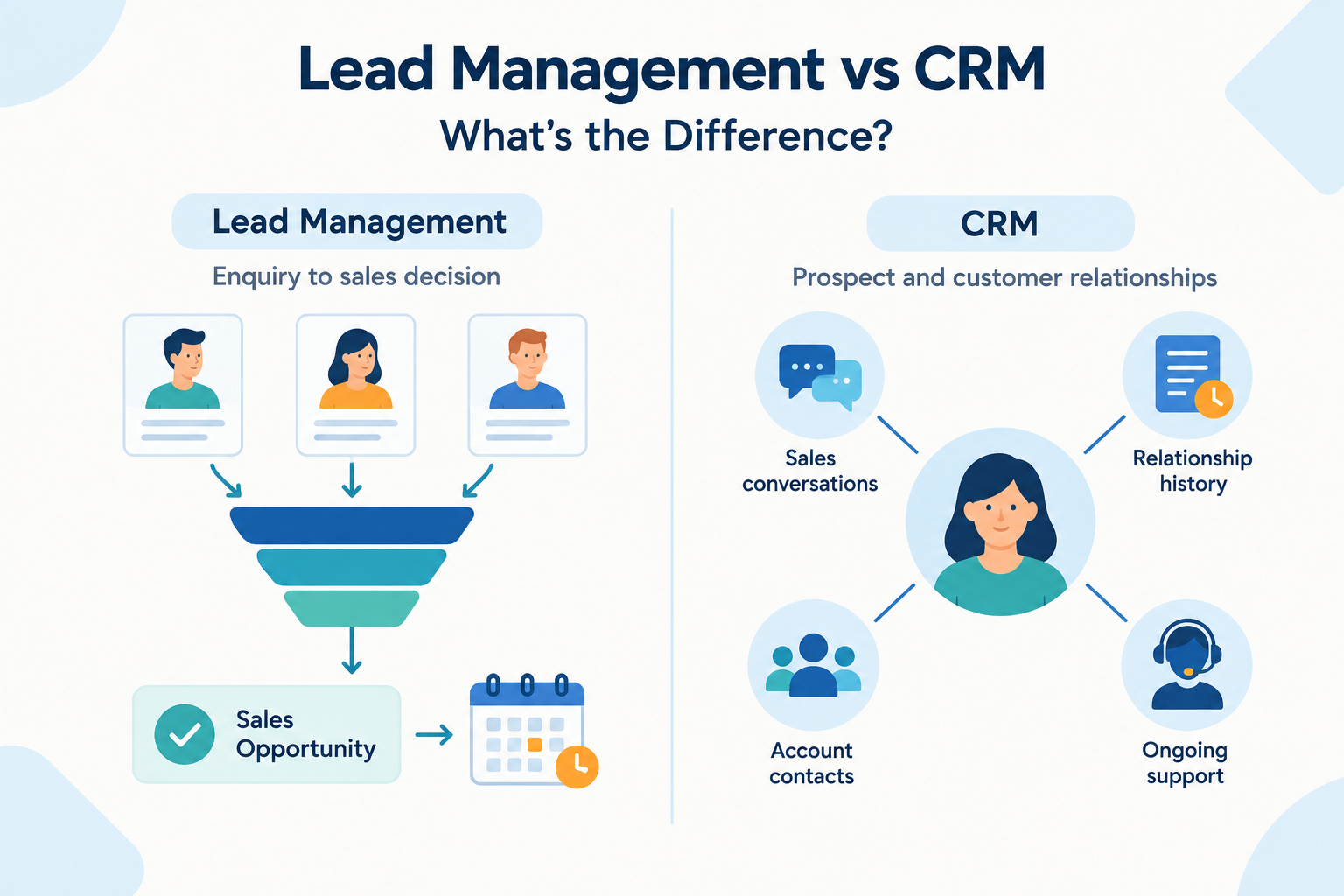
Lead management focuses on handling prospects through a sales decision. CRM covers the broader practice of managing prospect and customer relationships. CRM software may include lead management capabilities.
Is lead management part of CRM?
Yes, lead management is commonly part of sales CRM workflows. The depth of support varies by product.
Can I manage leads without a CRM?
Yes. A spreadsheet and calendar can support a simple process. CRM software becomes useful when shared records, communication history, and reminders become difficult to maintain manually.
Do I need separate lead management and CRM tools?
Often, one CRM with suitable lead management capabilities is enough. Separate tools may make sense for specialist requirements, but check how records and activity will stay connected.
Can a CRM help with lead generation?
Some CRMs support forms, campaign integrations, or other tools that help capture enquiries. Attracting interested prospects still requires a marketing or sales activity, such as advertising, referrals, or outreach.
Is Ridhzo a CRM or lead management software?
Ridhzo is a lead-focused CRM. Its documented mobile and follow-up capabilities support activities such as accessing lead information, contacting prospects, recording call activity on supported Android setups, and managing dated follow-ups.
Choose Around Your Team’s Daily Work
Start by identifying where your sales process breaks down. If enquiries lack owners and callbacks are missed, focus on lead management. If the challenges extend into ongoing customer relationships, include those requirements in your evaluation.
For a team that handles enquiries primarily from phones, explore Ridhzo using a real lead journey: open the record, make contact, add context, and schedule the next action.