
A potential customer asks about your service. You respond, share the details and wait.
Then the conversation goes quiet.
They may be busy, comparing options or unsure what to ask next. A useful follow-up gives them a clear way to continue the conversation without making them feel chased.
A 7-day lead follow-up sequence helps your team decide when to contact a new lead, what to say and when to stop. It also keeps follow-ups consistent when several people handle incoming enquiries.
Here is how to build one, with a practical schedule and message examples you can adapt.
What Is a Lead Follow-Up Sequence?
A lead follow-up sequence is a planned series of contact attempts after someone expresses interest in your business.
Each step has a purpose, a channel and a scheduled time. For example, you might respond to an enquiry on the first day, share useful information two days later and send a final check-in at the end of the week.
A sequence should change when the person responds. Once a conversation starts, the next action should reflect what they actually need.
For a broader introduction, read how to track every lead from enquiry to sale.
Before You Start: Choose the Right Leads and Goal
The example below is designed for recent inbound enquiries that have not yet become an active conversation.
It is a suggested starting point for a small business, rather than a schedule every lead should receive.
Someone who requested a consultation may welcome a prompt follow-up. Someone who downloaded a general guide may need a lighter approach. An old contact should not automatically receive the same sequence as a person who enquired today.
Before enrolling a lead, confirm:
- What they asked about and when they enquired.
- Which communication channels they expect you to use.
- Who owns the lead.
- Whether anyone has already spoken with them.
- What next step would genuinely help.
Choose one main goal, such as booking a consultation, arranging a site visit or confirming the requirements needed for a quote.
“Close the sale” is usually too broad for an early follow-up sequence. “Help the prospect book a suitable consultation” gives each message a clearer purpose.

A Practical 7-Day Lead Follow-Up Schedule
A seven-day sequence does not require seven messages.
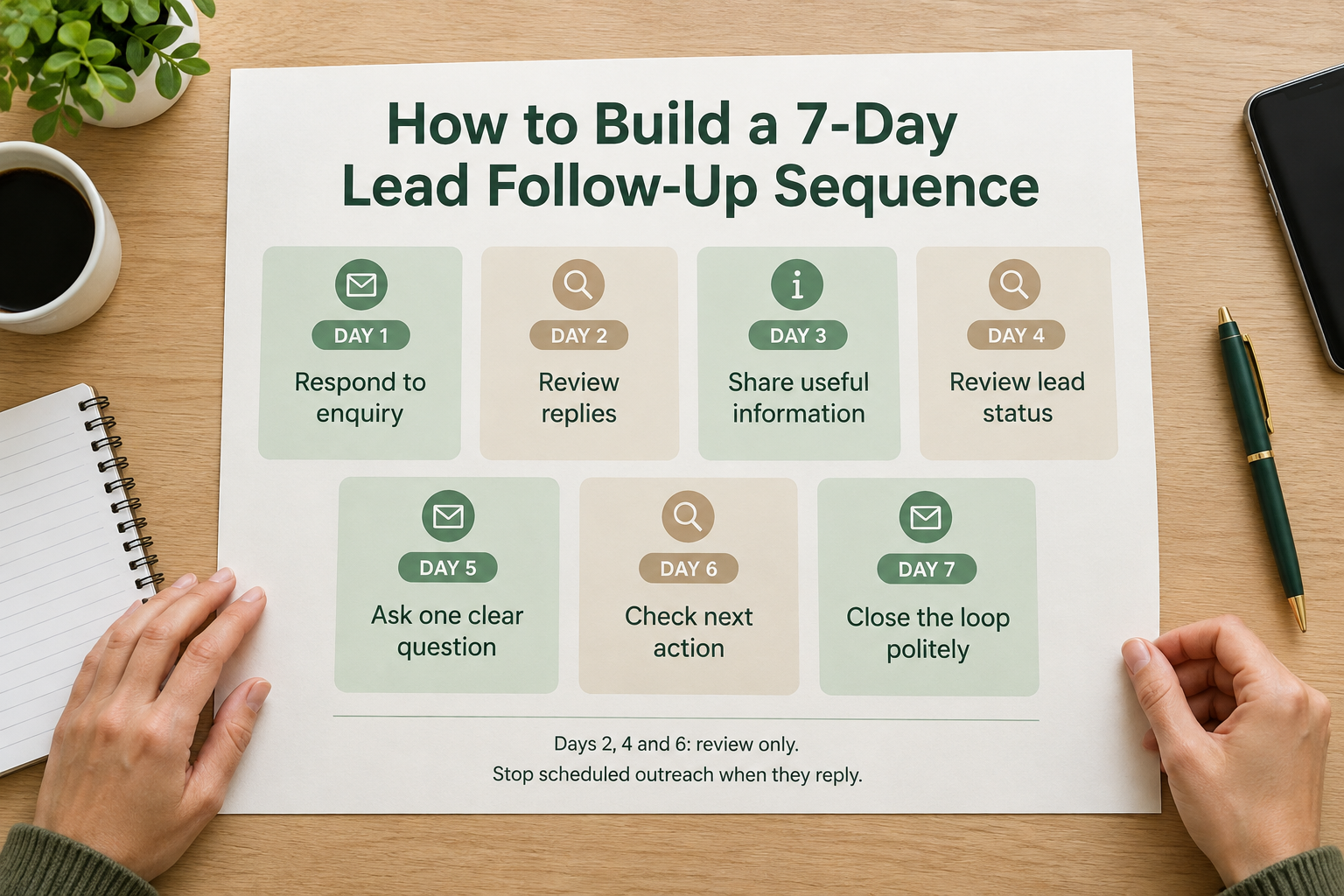
This example uses four planned contact attempts, with review days between them. If the lead replies at any point, stop the remaining generic messages and continue personally.
Use the channel the prospect chose or reasonably expects. Switching between WhatsApp, email and phone simply to get attention can feel intrusive.
Day 1: Respond to the Actual Enquiry
Your first response should show that you read the request.
Introduce yourself, answer what you can and ask one relevant question. Avoid making the person repeat details they already submitted.
For example, an interior design business responding to a kitchen renovation enquiry could write:
Hi Priya, this is Asha from Oakline Interiors. Thanks for asking about a kitchen renovation. We can help you explore the layout, materials and installation. Do you have a target month for the work?
If the prospect asked for pricing, address pricing as directly as possible. When you need more information before quoting, explain what you need and why.
Send this response promptly during staffed hours. An automatic acknowledgement can confirm receipt, but your team should still review and answer the enquiry.
Learn more about speed-to-lead and why response time matters.
Day 2: Check Before Sending More
Use the second day to check the record.
Did the prospect reply through another channel? Did a colleague call them? Was the message delivered? Have they already booked a consultation?
This review helps prevent duplicate outreach and messages that no longer fit.
If they have responded, record what was discussed and agree on the next action. Do not continue the original sequence simply because it was scheduled.
Day 3: Share Something Useful
Your second message should add information that helps the person make a decision.
Useful material might include:
- A short explanation of your process.
- A relevant brochure or service guide.
- A pricing breakdown, where available.
- Answers to common questions.
- A real example of similar work.
Choose one resource rather than sending a large collection of attachments.
For the kitchen renovation enquiry:
Hi Priya, I’m sharing our kitchen planning checklist. It covers measurements, storage and the decisions that affect the quote. If you already have a rough floor plan, you can send it over and I’ll explain what we would need next.
Only mention or attach resources your business actually has.
Day 4: Leave Space and Review
There does not need to be another message today.
Check whether the lead has replied, requested a different contact time or moved into an active sales conversation.
If someone says, “Please contact me next month,” replace the remaining sequence with a follow-up for the agreed date. Their stated preference should guide the timing.
Day 5: Ask One Focused Question
By the fifth day, another generic “Any update?” message may offer little value.
Instead, ask a simple question that helps identify what the prospect needs.
For example:
Hi Priya, would it help to understand the likely budget first, or would you prefer to discuss the layout? I can help with whichever is more useful at this stage.
The question should be easy to answer without requiring a meeting.
Avoid pressure, invented deadlines or assumptions that silence means the person is ready to buy.
Day 6: Check the Next Action
Review the lead before the final message.
Look for a reply, a phone conversation or any new information that changes the next step. Make sure someone is responsible for handling a response.
If a meaningful conversation has started, the lead needs a specific action—such as preparing a quote or arranging a visit.
Day 7: Close the Loop Politely
The final message should make it comfortable to reply, defer or stop.
For example:
Hi Priya, I’ll leave the kitchen renovation enquiry with you for now. If you’re still exploring it, I’m happy to help with the next step. If the timing has changed, just let me know when you would prefer me to check back.
After this message, end the short sequence.
Do not automatically restart it because the person has not answered. Review whether the lead should be closed, left inactive or scheduled for a later follow-up they have requested.
How to Make Every Message More Useful
Keep One Main Purpose per Message
A follow-up that asks someone to review a brochure, answer five questions and book a call creates unnecessary work.
Choose one useful action.
“Would you like the fee breakdown?” is easier to answer than a message containing several unrelated requests.
Personalise Beyond the First Name
A name alone does not make a message relevant.
Refer to the service, location, course, product or requirement the prospect mentioned. Use the enquiry details to avoid asking questions you already have answers to.
Check that any personalised information is accurate before sending.
Match the Channel to the Conversation
If the prospect asked for an email quote, send the quote by email.
If they requested a WhatsApp response, use that route where appropriate. A phone call may be useful when they asked for one or the enquiry needs discussion, but it should replace a planned contact attempt where sensible.
For more context, read what a WhatsApp CRM is.
Make Stopping Easy
Stop the sequence when the prospect declines, asks you to stop or begins a conversation that needs a personal response.
Use appropriate permission for the channel. For WhatsApp Business API messaging, account for the applicable messaging window and approved-template requirements.
How to Set Up a 7-Day Follow-Up Sequence in Ridhzo
Ridhzo supports multi-step sequences using WhatsApp and email, with scheduled day offsets, personalisation tokens and links or attachments.
Here is how to translate the suggested schedule into a practical setup.
1. Define the Sequence’s Purpose
Choose a clear name, such as “New Kitchen Enquiry—First Week.”
Specify which leads belong in it and the intended next step. Start with one enquiry type so the messages stay relevant.
2. Add the Four Message Steps
Ridhzo sequences use day offsets from enrolment. If the enrolment date is Day 1 of your plan, use:
The review days are team activities, not additional automated messages.
Check that the first step does not duplicate a response the lead has already received.
3. Choose the Channel and Personalisation
Each Ridhzo sequence step can use WhatsApp or email.
Personalisation tokens include the lead’s first name and supported custom fields. Use them where they improve relevance, and test what happens when information is missing.
WhatsApp behaviour depends on your setup. In personal WhatsApp mode, sequence steps become timeline reminders for the representative to send manually. Automated WhatsApp sending requires the Business API setup.
Do not assume that a reminder means a message has been sent.
4. Set Suitable Sending Hours
Ridhzo sequences support sending windows based on the organisation’s configured timezone.
Check these settings before enrolling leads. If your prospects are in different timezones, choose timing that is suitable for them rather than assuming the system uses each recipient’s local time.
5. Enrol a Test Lead
Ridhzo supports manual enrolment from the lead profile and automatic enrolment through automations.
Start with a test lead and check:
- Whether the right sequence starts.
- Whether the day offsets are correct.
- Whether names, links and attachments work.
- Whether messages or manual reminders appear as expected.
- Whether captured replies stop the sequence.
Once the workflow is working, use automation to enrol appropriate new leads.
6. Check Stop Conditions and Manual Handoffs
Ridhzo documents automatic sequence stopping for captured WhatsApp or email replies and when leads are marked won, lost or unqualified.
Reply detection depends on the connected communication route. Do not assume that a conversation in a personal WhatsApp account or an offline phone call is automatically detected.
Make it part of the representative’s routine to check and stop remaining outreach when contact happens outside the connected workflow.
What Should You Measure?
Review whether the sequence produces useful conversations and agreed next steps.
Start with these measures:
- Replies: How many enrolled leads responded?
- Meaningful conversations: How many replies clarified a need, question or buying decision?
- Next steps agreed: How many leads booked a consultation, requested a quote or took another relevant action?
- Negative responses: Did anyone complain about frequency or ask you to stop?
- Delivery problems: Were messages failing or contact details missing?
Ridhzo’s sequence funnel view shows how many leads are at each step, have completed the sequence or were removed early after replying or converting.
Review those figures alongside the actual conversations. A high reply count is not necessarily a good result if many people are asking you to stop.
Common Lead Follow-Up Mistakes
Sending the Same Message Repeatedly
Repeated “Just checking in” messages give the prospect little reason to respond. Add information, answer a likely question or make the next step clearer.
Contacting the Lead on Every Channel
A WhatsApp message, email and phone call on the same day can feel excessive. Coordinate outreach so the team knows what has already happened.
Automating Before Reviewing the Enquiry
A sequence can support the response process, but it should not send irrelevant information to every lead. Read the request and confirm that the sequence fits.
Continuing After a Reply
Once someone responds, use their answer to guide the conversation. Generic scheduled messages can contradict what a representative has just agreed.
Treating Seven Days as a Buying Deadline
Some decisions take longer. End the initial sequence after seven days, then choose a suitable next action based on the prospect’s needs and preferences.
Frequently Asked Questions
How many follow-ups should a seven-day sequence include?
The example in this guide uses four contact attempts across seven days. Treat that as a starting point and adjust based on enquiry type, urgency, channel and prospect preferences.
Should I follow up every day?
Usually, a new inbound enquiry does not need a message every day. Leave time for the person to respond and make sure each contact adds something useful.
What happens if the lead replies halfway through?
Stop the generic sequence, answer their question and agree on the next action. If they request contact at a later date, schedule that instead of continuing the remaining messages.
Can I automate the whole sequence?
You can automate suitable message steps with the right setup, but someone still needs to review replies, handle exceptions and continue the conversation. In Ridhzo, WhatsApp steps in personal mode require manual sending.
What should I do if there is no response after Day 7?
End the sequence and review the lead. Avoid marking the opportunity won or lost without a basis, and do not restart the same messages automatically. Follow your process for inactive enquiries or later contact where appropriate.
Start With One Clear Follow-Up Process
Choose one type of new enquiry, write four useful messages and define when the sequence should stop. Test the timing and reply handling before expanding it to more leads.
If you use Ridhzo, start with one WhatsApp or email sequence and a test lead. Use the first week’s conversations to improve the messages before enrolling a wider group.